Welcome home.
iFold 1.4.8. Android 12 or newer.
Download iFold
Open this page on your phone and download the signed APK.
Open and install
Tap the download. If Android asks, allow installs from this source, then tap Install. You can turn that permission off afterward.
Pick your look
Tap the Settings gear on iFold Home, then Match website preview. Your app order stays intact. Choose Light, Dark, or Automatic.
Make it Home
In iFold Settings, open Default Home app and choose iFold. Home will then return here from other apps. You can also use:Settings → Apps → Default apps → Home app → iFold
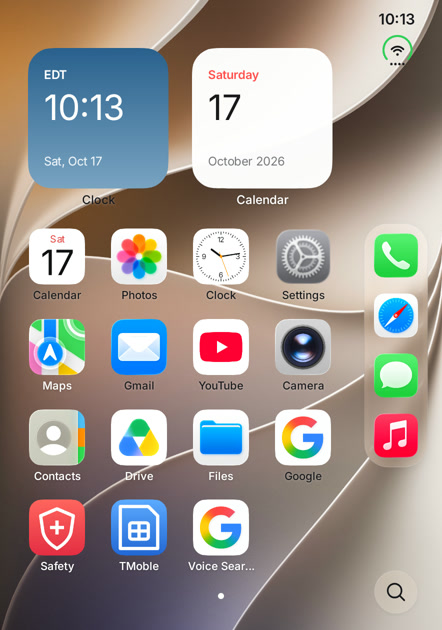
Try it alongside your current launcher
Download iFold Glass Lab to try the same experience in a separate app. Skip the default Home choice and optional permissions. Press Home to return to your usual launcher. Your existing iFold installation keeps its own layout and data.
Keep it open when you fold shut
On your Galaxy Fold, open Android Settings → Display → Continue apps on cover screen and enable iFold. Samsung controls whether the cover display stays on. Samsung’s guide.
Why do apps open outside iFold?
Phone, Camera and your other apps still run as Android apps. iFold changes Home and its own panels. Choose it as your default Home to return here with the Home gesture. The Settings gear opens iFold preferences; Android Settings is a separate option there.
The gestures
Swipe down on the grid for Search. Swipe from the top right for Control Center. Swipe between your Home pages. Tap the Settings gear, or hold Search, to open iFold Settings.
Optional permissions
Notification access enables media controls and the activity pill. Modify system settings enables brightness and rotation controls. The home screen works without either.
Updating iFold
Install the newer APK over your current version. Your layout and preferences stay.
Back to One UI
Choose One UI Home under Settings → Apps → Default apps → Home app. Then uninstall iFold if you wish. No reset needed.